Eyeshadow Photoshop & GIMP Brushes
Posted in: Brushes | Tags: , , , , .

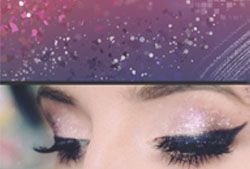
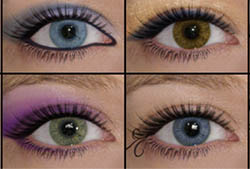
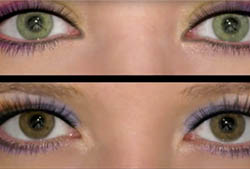
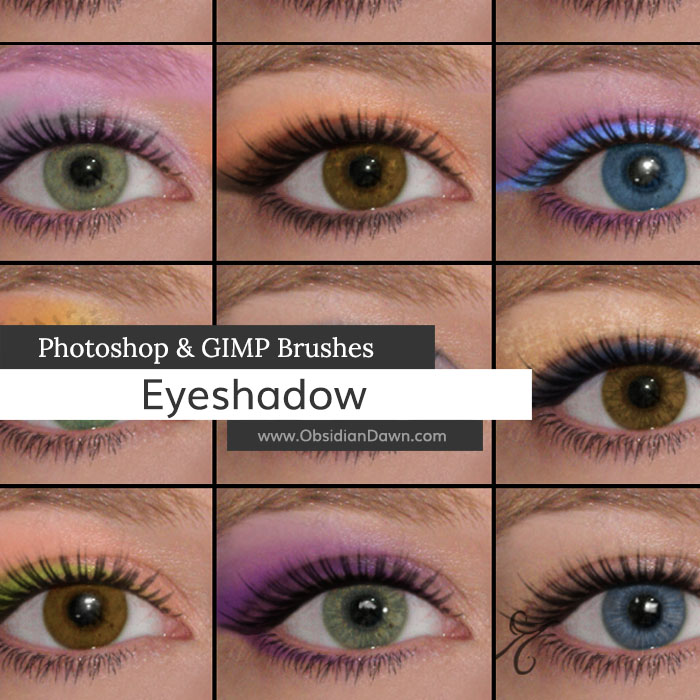
A set of Photoshop & GIMP brushes composed of various shapes of eyeshadow. It includes just most of the traditional eye shadow shapes, either broken up into individual brushes or all together. It also includes various glittery effects, patterned eye makeup, and face painting styled eye accents (a butterfly and a swirl). It should make your Photoshop makeup applications much easier and more fun! Brushes are included for both the right and left eyes.

It should make your Photoshop makeup applications much easier and more fun, without having to resort to the plain old one-color-without-much-shape shadow job.

Check out our video tutorial on how to make the most of these Eyeshadow brushes in Photoshop (also includes how to use the Eyelashes brushes, as well).

Brushes are included for both the right and left eyes (so it’s actually 26 unique brushes), for your convenience.

These are tons of fun to play with, so enjoy!

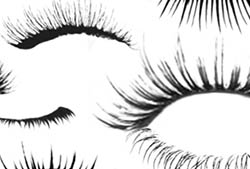
Also shown in the preview picture are our Eyelashes Photoshop & GIMP Brushes.

Eyeshadow Brushes

Programs: Photoshop 7+, Photoshop Elements 2+, Gimp 2.2.6+
Brushes: 52
Size: 2.73MB

Eyeshadow Brushes
How to Install?
Terms of Use
 

Download the image pack (for those without Photoshop & GIMP)

104 Responses to Eyeshadow Photoshop & GIMP Brushes

  1. Lucas says:

    Hey, I really really like your brushes! But how can I change the colors? like they are all black…so how can I change the color to like…green?

  2. Stephanie says:

    @Lucas: Select green as your color first, then click to use the brush. If it’s not letting you select green, then you’re not in RGB mode. Switch the color mode, then you’ll be good to go! I think it’s under Edit > Change Color Mode or somesuch.

  3. Lawcatt509 says:

    I love your brushes they are simply fantastic !!!! plus easy to upload and all :) .. Just one questions . Do you have any Wedding brushes and eye brow brushes ? would love to see some or if you know where i can find some in a zip file ofcourse i use photoshop 7 . Thank you and keep up the great work :)

  4. Stephanie says:

    @Lawcatt509: I’m afraid I have neither! They’re both on my “to do” list, though.

    And I don’t keep up with other brush creators at all, to try to make sure I stay as original as possible – sorry that I couldn’t help more!

  5. Dennise says:

    Hi, Let me just say that all your brushes are extremely beautiful and Im happy that they’re compatible with Gimp cuz I ain’t payin for photoshop… lol anyways, i have one problem. They dont show up on the brushes list on the Gimp Program. I did everything correctly, I put them exatly where they should be. Program Files (x86) > Gimp 2.0 > Share > Gimp > 2.0 > Brushes. I put the brush jpgs there where the rest are. I’ve refreshed the brush list and restarted the program but it wont show up on the brush list. I dont understand what im doing wrong…

  6. Stephanie says:

    @Dennise: I’ve had a few people tell me that they’ve had the same problem, and there’s an easy fix. However, I’ve had each one tell me the “fix” was a different thing. So, what I’d do is either browse through the comments below and find what works for you (the tips are all there), or look for another tutorial from someone that USES GIMP and knows how to install PS brushes into it. Sorry I couldn’t help, I haven’t ever used it. :(

  7. Denise says:

    I want to downlod these shadow brushes as well as the eyelashes… My question is, I have Photoshop elements. Will the download precedure for photoshop work the same way in elements or will have I have to do something different??

  8. kassy says:

    this wont download.

  9. Stephanie says:

    @kassy: Try again? Just worked for me! Perhaps it was a temporary problem.

  10. ruben says:

    saludos, stephanie desde Panama buscando encontre tu pagina ha sido de gran ayuda para mi.me he iniciado en el fotoshop y tengo muchas cosas que aprender con los buenos maestros.

  11. ruben says:

    thanks,I’m happy because you help us!
    i wanna learn of good teacher as u.I am from Panama city.
    SINCERELY,THANK SO MUCH!

  12. drus says:

    gorgeous brush…thanks

  13. rayzr says:

    Awesome! Now I can give myself guyshadow without the humiliation of having to go out and buy it.

  14. gimpfreak says:

    wait…how do i download them???

  15. Stephanie says:

    @gimpfreak: Clicking on “DOWNLOAD THE BRUSHES” would be a great place to start. :) I have tutorials for installation in my sidebar if you need it, as well.

  16. Linda W. says:

    Hey there! Are all your brushes in windows format or any in mac. Not sure why I don’t get them. Probably just me but the little download icon just goes on and on and I don’t seem to be getting them. They look fabulous and I sure don’t have a problem linking.

  17. Stephanie says:

    @Linda: It may have just been a temporary problem with the servers where my files are stored, perhaps. Give them another try? If they’re still giving you trouble, I can email them to you.

    They will work for both Windows and Mac. All that matters is the version of the program you want to use them in (GIMP, Photoshop, etc).

  18. Mungo says:

    Superb, thank you very much

  19. Kim says:

    Can’t even remember how I stumbled across your site but I am so glad I did! I love your brushes and I just saw the make-up brushes. I am a photographer and make-up artist and I can not wait to play around with these brushes. Thank you so much for making these avaiable!!

  20. Kate says:

    Dammit, stop making me download all of your brushes! It kills me how great they are.

  21. ernesto7677 says:

    it is wonderful comeback to old days when to produce eyelashes required a big skill ,today all it takes
    are these wonderful brushes following the instructions accordingly

    GRACIAS

  22. neha says:

    how to download brushes

  23. Harumi says:

    I’m trying to add makeup to my picture in Photoshop CS5, but I don’t know how to open, find, or use these brushes. This is my very first time in PS so I don’t know how to use or work anything. Do you think you could help me out with this, please? I would really love to learn to add makeup to my pictures and stuff. I even downloaded your eyelash brush pack. Do these packs work on Photoshop CS5?

  24. Harumi says:

    Hi again,

    Disregard my previous question I found your tutorial for adding and installing the brushes. I am using them just fine now, but the problem is my eye shape is weird so it is hard to place the eyeshadow and eyelashes on to look natural and fit my eye shape. Is there any way to edit them to form fit to my eyes?

    • Stephanie says:

      Yep. Use the eyeshadow brushes on their own layer (if you’re not sure about how to use layers, try a few of my other tutorials, they’ll show you) and then use Edit > Transform to rotate it and resize it until it fits properly. You can even use the warp one to make it fit the curve of your eye more precisely.

      Good luck!

Leave a Reply

Your email address will not be published. Required fields are marked *

*

You may use these HTML tags and attributes: <a href="" title=""> <abbr title=""> <acronym title=""> <b> <blockquote cite=""> <cite> <code> <del datetime=""> <em> <i> <q cite=""> <strike> <strong>