
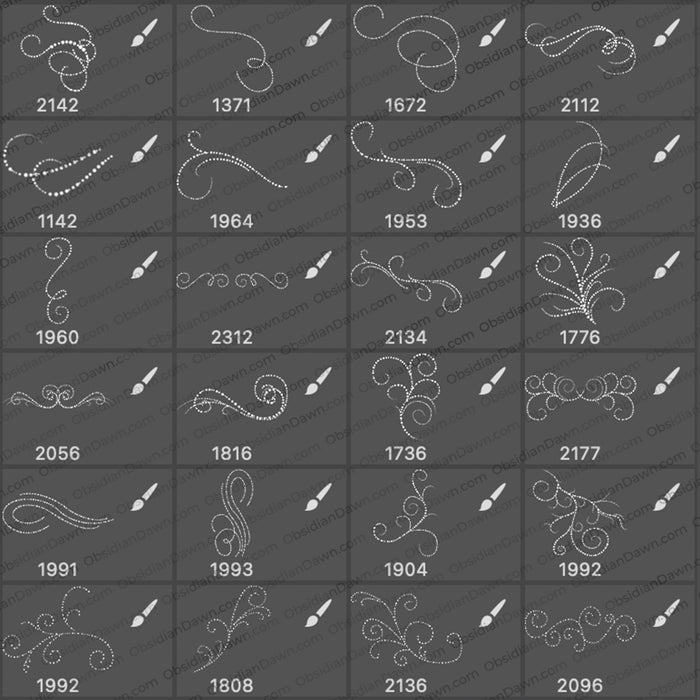
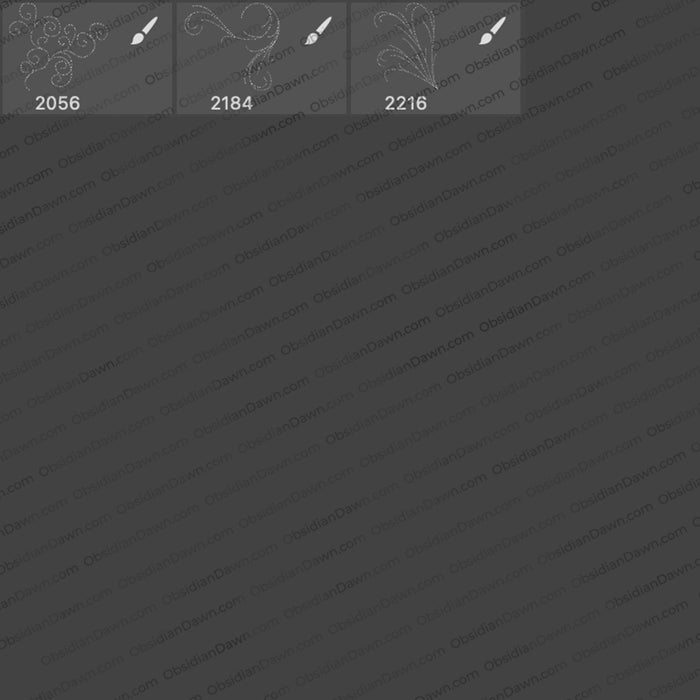
And finally, some brushes again. Here’s a set of Photoshop & GIMP brushes composed of various glittery swirls and flourishes. If any of you remember my “Dangling Glows” set, many of the swirls are made up of similar types of glows, while others are comprised of glitter and sparkles. They are all extremely high resolution, with an average size of about 2100 pixels.
This set combines the ideas of two of our most popular sets here at Obsidian Dawn: Glitter and Swirls & Flourishes II. Hope that you enjoy!

Programs: Photoshop 7+, Photoshop Elements 2+, Gimp 2.2.6+
Brushes: 27
Size: 6.53MB
Download the brushes
Download the image pack
Please read my terms of use before downloading!


75 Responses to “Glittery Swirls Photoshop & GIMP Brushes”
Fabulous! Thanks so much.
Thank you!
thank you so much, stephanie! love these!
Thank you, Steph! These are fabulous!
Thank you so much, can’t wait to play!!
Thank you, Stephanie! These are GORGEOUS!!!
Yummy – thank you. :)
Great as always Stephie :D
Thank you, thank you, thank you, thank you, yesterday I was just thinking to search for new ones and although I found some, nothing compares to yours, such a dedication such a beauty, you’re awesome! , nothing compares to you, again: many, many thanks, much appreciation, and God bless always. Roberto
Thanks a lot!
I’ve just started to RSS your site, and I love the things you offer. Thanks so much especially for providing GIMP materials. :)
Thank you again,Stephanie, for the wonderful brushes. There is nothing out there to compare with yours.
Prisca
Thanks so much Stephanie for your generosity in sharing your fantastic brushes with us.
Wonderful! thank you very much…..
Stephanie,
Your work is superb. Thank you so much for sharing your time and your talent with the scrappin’ world.
~Barbara
Stephanie, we’re so glad to see you back! Thank you for these terrific brushes. I know just what to do with them!
Hugs,
Jo
I looked, but I didn’t see a place where I could contact you directly… I just wanted you to know that I _love_ your brushes! They’re all of FABULOUS quality, and I’ve greatly enjoyed working with them over the past couple of days (I downloaded them all, lol). I’m glad the year’s finally slowed down for you, and I’ll see if I can whip up something for your contest, too. :-)
Thank you and greeting from Belgium
Thanks so much.
How do i put this on my photoshop ?
@mohsin: I have a tutorial in my sidebar that explains it, check out “Installing Brushes” under “Getting Started” Hope this helps! :)
Your all brushes are very definitely stunning! I love them. Please send me of your logo what I can put your credit of brushes. Thanks in advance and everything you do! Have a great April and Happy Spring!
Hugs
Thanks a lot, sweetie!!! I upgrade my Gimp and now, no more convertions :-))
Your brushes are all amazing and I can’t even describe how much I love working with them~
Thank you sooooooooo very much for sharing your WONDERFUL talents! i LOVE your creations and am soo very grateful for your generosity!! Have a BEAUTIFUL day! :)
Thank you for sharing!
I love gimp and will love to ;use these brushes. very nice resource.
These are brilliant, thankyou, just the thing for fancying up some of my wallpapers!
Hey,
just a novice to this kind of thing but how would I use these brushes and what software would I need to use/buy/download???
any help gratefully received
xox
@Jo15tar: I have answers to all that in my FAQ, for future reference. :) But basically, you can use my stuff with any graphics program. When I make brushes, patterns, etc. available, I ALWAYS put up an “image pack” to go along with it, which is just made up of the JPGs that I used to make the resource. But, if you want to actually use the brushes themselves, without needing to use the JPGs to make them into your own, then that means Photoshop, Photoshop Elements, or GIMP.
I also have tutorials explaining how to use the brushes in my sidebar, under the “Getting Started” category. Hope this helps! :)
I am enjoying your brushes! Amazing!
I just tried to download these brushes and it says “ID doesn’t exist”
Am I doing something wrong? I was able to download some other brushes.
Thanks!
@middagedmom: Eek! Not sure what happened there, but one of my scripts did bad things in the night. I restored it, and it’s working fine now!
Thanks for letting me know, and I’m glad you’re enjoying them. :)
These are amazing! I just love your work. Thank you so much for sharing so freely with all of us. Neat!
[...] Glittery Swirls Photoshop Brushes [...]
ola porfa me mandan filtros please jeje
I have most of your brushes and they are great! I really like them, thanks
THANK YOU SOOOO MUCH!!! :) Beautiful Absolutely Stunning! I Love it so much!!! :)
Thankyou soo much! lovely brushes :)
i love your brushes!! I’m having trouble downloading a few of them though. This pack and the Bokeh pack are both saying “This ID doesn’t exist.” Just thought I’d let you know! Thanks for all of the great work!
hii
i love sexy brushes
Great but how to use it on gimp portable
@Sachiko: I’m not sure at all what GIMP portable is, I’m sorry. You’d have to check with them to see if Photoshop 7+ brushes can be used with it, like they can with GIMP 2.2.6 and onward. These are primarily Photoshop brushes, but once GIMP added the functionality to be able to use them, I started “advertising” them as GIMP brushes, as well. If GIMP portable is the same as GIMP, then you can find instructions for how to install them in my sidebar under “Getting Started” where it says “Installing Brushes”.
Good luck!
wonderful! love it… thanks for making these public.
Thanks a lot!
Absolutely love your stuff! I use your lightbeam and sparkle brushes all the time!
Wonderful – thank you!
How do I use them on Photoshop Elements???
It’s lovely~!! Thanks so much!! c:
Is this free ?
I don’t know how to unzip if sum one can explain really easily thank you so very much.
@Paris: There’s a link in my sidebar, under “Getting Started” – called “How to Unzip” ;)
Hey Stephanie, little issue. All of a sudden, I can’t find any of the brush sets I’ve downloaded from you (including this one). I can’t load brushes anymore, when I do as I normally did to get a set out of the Temp files, I’m sent to a dead end.
Any idea what this is?
@svaler: Wow, I’ve never heard of this one! Are your brushes still in your Photoshop > Presets > Brushes folder? If they’re not, are Photoshop’s usual brushes there?
It sounds like that folder was somehow deleted or reverted back.
Another thing to try, if they ARE still there. Instead of choosing a brush set directly, try “Replace Brushes” and then browse to find the set you want to load, and load it that way. Does that work?
Let me know the answers, and I’ll try to help you through this!
These Are Beautiful,Thank You
Thanks a million.. I would love to learn how to make these and have them applied to PS like you do.. Where can I go to learn..?
@Andrew: I explain the technique that I used here: http://www.obsidiandawn.com/light-swirls-photoshop-gimp-brushes
Basically, use the brushes on their own layer and apply a layer outer glow in a bright color. I may make a tutorial on this at some point, too, so keep an eye out!
Fantastique, merci beaucoup.
Thanks for sharing with u!! T H A N K Y O U
Thank you for the beautiful brushes!
beautiful brushes
They were great! thankyou :)
just as great as your other brushes..:) thnxs
Great website!! Thanks a lot!
Great solution! Thank you for sharing these.
Hello!
Nice work, congratulations for your site!
Once the file is downloaded I am not able to open it. Maybe it is corrupted, don’t know.
Once again, thank you!!
@xoxo: Hmm, sorry about that! It’s working now :)
Thanks these are pretty
Thank you so much!
I have a question please— I have tried several times to DL some of your brushes and it seems my DL times out– so I haven’t yet gotten a brush. I have your images and they look awesome…… I even attempted to get gears program but that doesn’t seem to help either– any ideas?
Thank you for all of your beautiful work.
Butterflyiii2006
@butterflyiii2006: Hmm. Well, this could have been caused by a few things. If you tried a few downloads all within a few minutes of each other, there may have been a temporary error with the site where my downloads are all stored. If that was the case, you could try them again now and they’d work.
If you tried the downloads at different times, then there must be a setting in your browser that is disallowing my script to run (the script simply redirects you to the file). You’ll need to look up for your particular browser how to “allow” a certain website, and then put obsidiandawn.com in there.
If you’re still having trouble, I’m not sure what it could be, I”m afraid. They all seem to be working now, at least. So give it a go and see how that helps.
Good luck!
Wow you do such amazing work, thank you for sharing it with us!
Thank you Stephanie. Georgious brushes as always!
Thank you very much, awesome work!
Maravilhosos!
Obrigada.
Ive already downloaded it and put it in my photoshop folder but it doesnt show up
Leave a Reply
Other Links
Member Center
Getting Started
Affiliates
Helpful Links
Follow Us
By Program
Latest Downloads
Popular Now
Web Design and All Content
© 2004-2009 Obsidian Dawn