
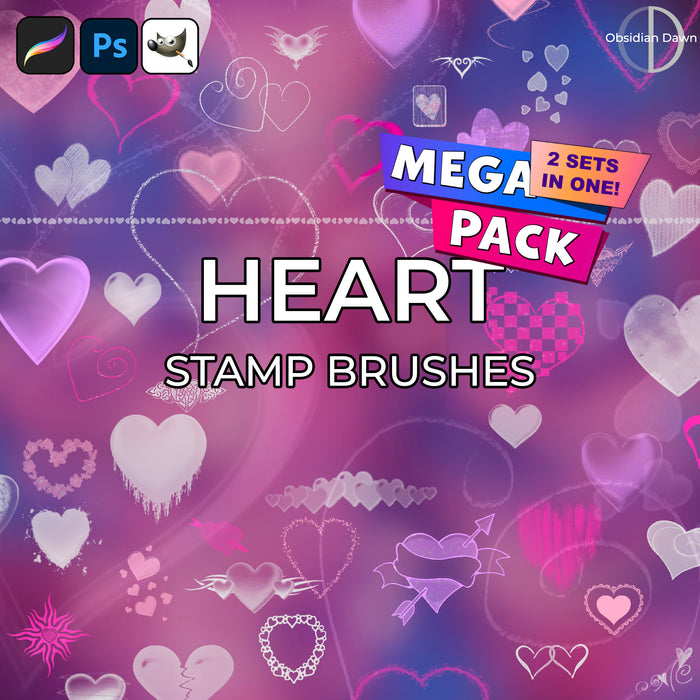
A set of Photoshop & GIMP brushes composed of hearts, hearts, and more hearts.

Be sure to also check out our newer Hearts II Photoshop & GIMP Brushes set!
Includes: heart clusters, hearts with arrows, broken hearts, heart borders, heart “bar” dividers, lacy hearts, flowered hearts, and even hearts made up of hearts!
Programs: Photoshop 7+, Photoshop Elements 2+, Gimp 2.2.6+
Brushes: 24
Size: 620KB
Download the brushes
Download the image pack
Please read my terms of use before downloading!


20 Responses to “Hearts Photoshop & GIMP Brushes”
These are beautiful.. Will they work on CS2 and CS3
cjfagan@bellsouth.net
Cindy: Yup, they work in all Photoshop versions after 7.
These brushes are the best!
well i have downloaded all of the brushes,,, they all r AWSUM…. TOO GUD
thaks for share this brush, I really love this brush :)
Wonderful brushes I LOVE them! TYSM!
Thank you so much for these gorgeous brushes;)
Thank you so much for sharing your AWESOME creations!! LOVE your stuff! hehe Hope you have a FANTASTIC day! :D
[...] Hearts Photoshop & GIMP Brushes Source: Obsidian Dawn Description: This set of 22 brushes includes heart clusters, hearts with arrows, broken hearts, [...]
This site rocks and so do A LOT of the brushes I’ve downloaded all but 2, and I love all the ones i have!
[...] Free Photoshop brushes: Hearts Photoshop & GIMP Brushes Source: Obsidian Dawn Description: This set of 22 free Photoshop brushes includes heart clusters, hearts with arrows, [...]
These were so sweet :)
I love them <3
Gorgeous! Thank you.
[...] Photoshop brushes: Hearts Photoshop & GIMP Brushes Source: Obsidian Dawn [...]
I can’t get over all the wonderful brushes on this site!! I’m forever grateful!
How do you download them to GIMP? I need help!
@Laura: Check out my sidebar link – “Installing Brushes”, that’ll get you going!
> Stephanie :Thank you very much!
Hey, I have been using your Brushes for GIMP for a long time now. But i just got Windows 7…And have no idea how to get the brushes in GIMP now! Please help!
when i download them, i open them up in winRAR and extract the folder to my desktop but it comes up on the desktop as like an unknown file type?
why is this? i’d love to have these brushes!
Leave a Reply
Other Links
Member Center
Getting Started
Affiliates
Helpful Links
Follow Us
By Program
Latest Downloads
Popular Now
Web Design and All Content
© 2004-2009 Obsidian Dawn