Jigsaw Puzzle Pieces Photoshop & GIMP Brushes
Posted in: Brushes | Tags: , , , .

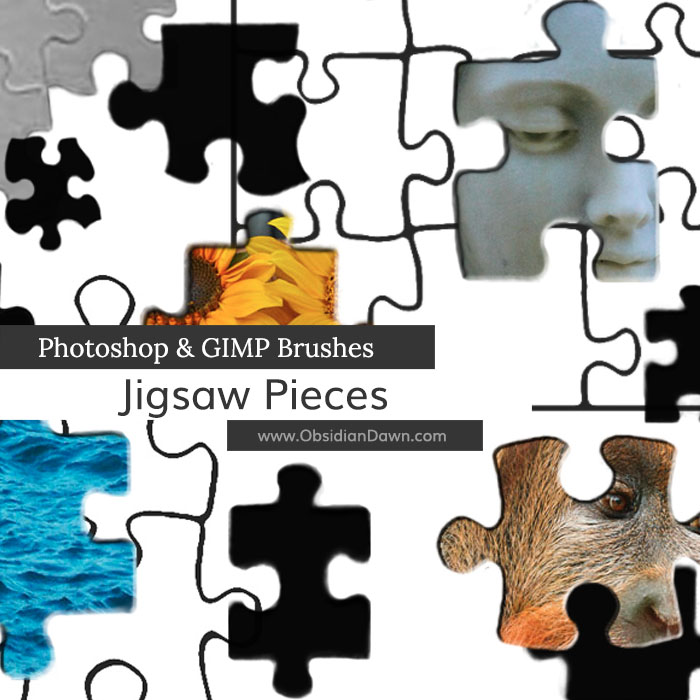
A set of Photoshop & GIMP brushes composed of various shapes of jigsaw puzzle pieces. Using a layer mask, they can be applied to another image to make your very own puzzle!

Includes: various shapes, corner pieces, edge pieces, as well as several jigsaw puzzle “templates”

Jigsaw Puzzle Pieces Brushes

Programs: Photoshop 7+, Photoshop Elements 2+, Gimp 2.2.6+
Brushes: 22
Size: 851KB

Jigsaw Puzzle Brushes
How to Install?
Terms of Use
 

Download the image pack (for those without Photoshop & GIMP)

Share and Enjoy:
  • Digg
  • Facebook
  • Twitter
  • del.icio.us
  • StumbleUpon
  • Blogplay
  • Google Bookmarks
  • Print

11 Responses to Jigsaw Puzzle Pieces Photoshop & GIMP Brushes

  1. Thanks so much. Nice – exactly what I needed.

  2. Jack says:

    Thanks so much for these, made my life a LOT easier!
    I may be using these for a commercial purpose – i’ll be sure to credit you and send you the final work if I use it :)

  3. uthi says:

    thank’s this fully help me

  4. Gar says:

    thank you – these have really helped me out!

  5. sss says:

    thank you very much :)

  6. sss says:

    hey but there is no set up file in these 2 packages
    its asking to purchase
    :x :(

  7. Suzan says:

    This is so awesome!!! All of the things here are actually :)

  8. Cyann says:

    Thanks a lot! Exactly what i need!

  9. lola says:

    i knw this is a stupied Q. but how do u use them???

  10. Stephanie says:

    @lola: Go to the sidebar and click on “Installing Brushes” – that’ll get you started. :)

  11. Ines says:

    Very useful,and nice, Thanks

Leave a Reply

Your email address will not be published. Required fields are marked *

*

You may use these HTML tags and attributes: <a href="" title=""> <abbr title=""> <acronym title=""> <b> <blockquote cite=""> <cite> <code> <del datetime=""> <em> <i> <q cite=""> <strike> <strong>