Aug 2 2006

Music Photoshop & GIMP Brushes
Category: Brushes | Tags: , , , ,

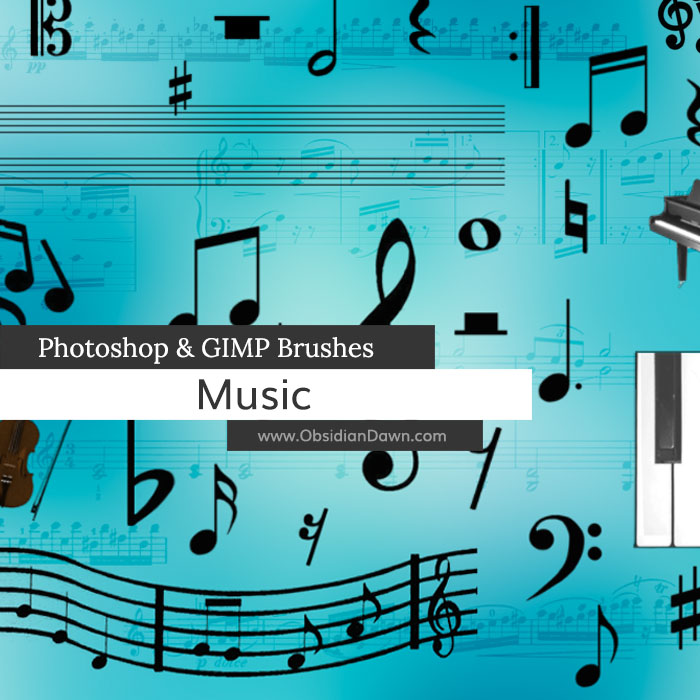
A set of Photoshop & GIMP brushes composed of various musical notes, clefs, rests, etc.

Music Brushes

Includes: a set of blank musical bars for you to “fill in” your own music, a piano, violin, and an octave of repeatable piano keys, sheet music, & more!

Programs: Photoshop 7+, Photoshop Elements 2+, Gimp 2.2.6+
Brushes: 32
Size: 781KB


>> Download the brushes
>> Download the image pack

Please read my terms of use before downloading!

35 Responses to “Music Photoshop & GIMP Brushes”

  1. Laura

    Thanks, they’re great

  2. Very pretty! I love it!
    Thank you

  3. Ma’am, you did it again! I am so so so so happy that you had these available. Did you know that there are hardly any “good” musical brushes out there on the web? And the fact that your are free… well I am estactic (sp?). Anyways… wanted to say thank you (for all your hard work and for saving my butt, once again:D)

    -Igloodwellerz

  4. Thank you so much – these are exactly what I was looking for and I just knew your place would be where to find them! :)

  5. Francesca

    Thank you so much! I’ve been looking for this kind of brusches for an age! And they’re really beautiful!:D:D

  6. SeaDream

    “Thanks a lot” is not enough here, ’cause i was looking for such brushes for a long time.. So i’m happy now ))) they are wonderful

  7. nel

    Thanks a lot for this brush =)

  8. Wow, you have a lot of brushes on this site! Thanks for sharing!

  9. sarah smith

    this is awesome!!!! thanks so much!

  10. French Horn Lover

    Thanks! I love these brushes, and I thank you lots for that! :D

    <3
    FrenchHornLover

  11. andrewl.t.cheong

    omg! these brushes are not what i am expecting. prob. not so goood. too simple

  12. @andrew: Sorry to disappoint! I thought the preview image showed pretty clearly what they were like. :( There’s a few brushes of completed music in there, too, if that’s what you were looking for.

  13. kellyn

    @andrew: what absurd rubbish are you talking about?

    theses brushes are great! thx!

  14. leafoley

    Thanks for the brushes, my son is into lots of different musical instruments and these will work great for his pages.

  15. thank gawd for yoo!! i’ve been tryin to find music brushes for ages since we got a Mac.. >.<

    xx

  16. jakes

    thank you a lot, great work

  17. I just wanted to leave some love for you.
    I didnt snag this set of brushes, but I did snag most of the others! Your work is amazing! and the fact that you offer such high quality work for free is just so wonderful.

    I had to comment on the person who said. “omg! these brushes are not what i am expecting. prob. not so goood. too simple”
    You are a jerk. Didn’t your mother ever teach you, if you cant say anything nice, don’t say anything at all?

    Anyways, that blew me away.
    I just had to make sure I let you know that I appreciate all of your hard work, time and most of all.. talent.
    God bless,
    Christin @ Fairchild ABF, WA state

  18. Sonya

    I just wanted to take this time to thank you for such an enlightening and delightful website. Although I have used previous Photoshop programs, I am new to CS3 and happen to stumble upon your web page while looking for brushes. I didn’t know all of this was out there for the photoshop programs. I’m in deep gratitude to you for the things I have learned on your website today. I love it

  19. [...] picture files website here: [link] Terms [...]

  20. marilyn

    Thanks so much for these lovel music brushes.

  21. ~Val

    Thanks so much for these! I have several family members who are seriously into music and I’m always on the lookout for stuff to make PS greeting cards for them.

    Your talent is amazing and your generosity if MUCH appreciated!!

  22. Yvana

    Thank you so much! The brushes are beautiful – exactly what I was looking for!

  23. Thank you so much for these brushes. I’m planning on creating a Twitter background with your brushes for one of our twitter accounts. Thanks for the use and I will definitely give you credit for the wonderful brushes!

  24. acinam17

    this is good! thanks a million! :D

  25. Celly

    Thankyou these are great :)

  26. Thank you for the notes!! Awesome.

  27. Thank You!!! I always get downloads from here!!!! ;^}

  28. Juju

    Thanks a lot :))

  29. japanscrystaldragon

    can some one help me i use the program gimp and when ever i try and upload these bruses it says ” failed: Unknown file type”
    please help these brushes look great

  30. @japanscrystaldragon: Do you have GIMP 2.2.6 or higher? It’s required to use these. If so, check out my sidebar for “Installing Brushes” – that’ll get you going!

  31. japanscrystaldragon

    thanx for the help luv ur creations

  32. Thank You!!! Love to get them :-)

    *hug*

  33. Kim

    These are so beautiful, too! Thank you.

  34. Rich

    So, I’m new at this but when I copy the .abr file into the Brushes folder, then close Photoshop 7.0 and reopen it still doesn’t show up on my list of Brushes. I feel like I’ve checked everything…obviously I’m missing something though.

    If anyone can help that would be great. Thank you in advance.

    Your brushes look awesome…hope I can figure out how to use them :-|

  35. @Rich: Hmm. Sounds like you’re doing everything right! It’s unzipped, sounds like – and you’re restarting Photoshop… it SHOULD be working. Try using “Replace Brushes” from that menu that comes up on the brush set selection screen, and find them and try to load them that way – then see what it says. If it works, then that’s one way you COULD use them, although it’s not very convenient, that’s for sure! If it doesn’t work, let me know what it says.

    One other possibility is that the download was corrupted, although that will usually not let you unzip the file even…but who knows. Try a few different brush sets, as well, just to be sure it’s not for some reason restricting them for some reason (although I MAKE them all in PS 7, so that shouldn’t be it).

    Let me know!

Leave a Reply

See Your Image here - Submit Now!
Obsidian Dawn on Facebook