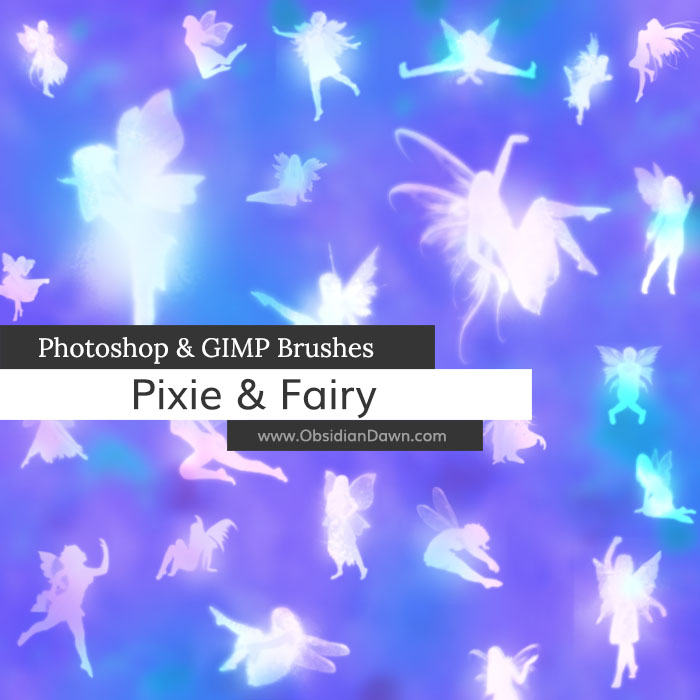
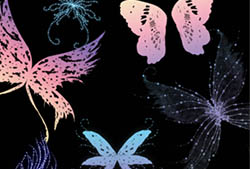
A set of Photoshop & GIMP brushes composed of various glowing pixies. Faeries, fairies, pixies… whatever you want to call them, they’re cute and they’re aglow!

Includes: all kinds of poses – sitting, standing, playful poses, soaring / flying, etc!
Programs: Photoshop 7+, Photoshop Elements 2+, Gimp 2.2.6+
Brushes: 28
Size: 3.57MB
Download the brushes
Download the image pack
Please read my terms of use before downloading!


37 Responses to “Pixie & Fairy Photoshop & GIMP Brushes”
Brilliant set ^^
I got your link of a site were you said it was yours.
I couldn’t open there format so I tried the orginal sorce ^^
x
@JessieDeMessie: Let me know if it doesn’t work for you! Sometimes downloads can become corrupted, so there may not be a problem with the file. Which site was it from?
Thanks, hope it works!
O i used these ro make a pic for my friends kid :D
there so pretty!!!
Hello,
Could anyone please tell me how to install
these brushes in GIMP 2.4.7 ? Because I
don’t really understand that :)
This brush set is very pretty by the way !
Beautiful brushes!
awwwww!!!! they are really cute. i wonder if you can do something similar as angels. i was looking around and can’t find anything good.
could really need some cute angels for my creations. :)
I am a new Photoshop Elements user and found your website through the Photoshop Elements magazine.
I was amazed at how quick and easy it was to download and install your brushes. I didn’t even know other brushes were available.
Great instructions! Thank you for this service.
I am making bookmarks for gifts. I downloaded some pixie and glitter brushes and they look great with the photos I selected. I colored them pink and my grandchildren will love them. The problem comes when I select all to copy and paste for printing into another document for printing the bookmarks.
When I select all, the brushes become outlined in selection mode even through I have flattened the layers. When I copy and paste into another document for printing, the pixies and glitter brush area lose their color and everything resorts to white.
Am I missing a step somewhere? Everything looks great on the bookmark but I can’t seem to get the brush images to stay put or to stay colored.
This is my first time using brushes and I hope I’m explaining this correctly. Once I use and place the pixie brush, am I supposed to double click or something to get it to stay put? As long as the brush is in mask mode, the color stays put. As soon as I switch tools, the brush goes back to selection and the color disappears as well.
I’ve read several tutorials on brushes, but I can’t seem to find an answer to this. I hope someone out there knows what I’m trying to explain and can help me out.
Any help you can give me would be appreciated.
Gloria: Well, you shouldn’t need to be using masks. I mean, if you’re just adding fairies in a simple, one color… all you should have to do is select the paintbrush tool and click once on your canvas to create the fairies.
However, even if you were using masks… if you are flattening the layers like you say, I’m not sure what could be happening. Once the image is flattened, it should copy/paste exactly how you see it. You could try to select all and then instead of CTRL-C, use CTRL-SHIFT-C to copy all of the layers together, and then paste. If that isn’t working either, I’m not sure what to tell you other than don’t use masks and just use a standard paintbrush tool to apply the brushes.
It sounds like it’s having you copy the masked layer, though, which – without the mask – will come out plain white, like you’re saying.
Hope this helps!
Hi Stephanie,
Being new to Photoshop, I didn’t realize there were 2 brush tools in the toolbar. I was using the Selection Brush Tool and I didn’t realize it wasn’t the Brush Tool. The Brush Tool icon showed up as a pencil and I didn’t know it was also a brush.
Thank you for your help in this matter. I love your brushes and in my new enthusiasm for these, I have sent at least 20 people to your site.
Thanks again.
These are just Superb! Just the thing to fill around some Tink tags I’ve been playing with :) TYSM
[...] be utilizing her art on this new design, but even if I don’t, she deserves kudos! See the pixie brushes she’s [...]
I don’t believe I never saw these before. I’m going to have to make something with them soon.
I shared a link with my class to your site. Hopefully they’ll check it out!
YouR brushes is very Beautyfull
I Love it !! ^^
these are just gorgeous!! Thank you – any chance of some angels ???? :)
Hi I used your brushes here. Thank you . Dont tell anyone Im hoping people think there real, :)
Thanks for these Stephanie…thats strange I could have sworn your name was Dawn :)
@wightmagik: You’re not the only one who’s made that mistake. :)
this brushes r so cool
Heey, i use these for personal use.
(I’m a kid :L)
I show off my work on bebo and i just wanted to say if my tutorial group ever becomes popular (it has one member, me :D)
i will definatley credit you for all these amazing bruses ;)
beautiful brushes, thank you for creating them
[...] 下载 | 下载页面 [...]
[...] 下载 | 下载页面 [...]
Beautiful – thank you!
Omg! These are totally helping with My Howrse Layout Making! Thanks So much!
thank you so much
these are so great
thanks again for letting us use them
They are so cute :P
Thankyou for sharing :)
Btw Sara, If you want members in your toturial group, post the link, I would check it out :)
To this pic of my son taking a rest during play time…thought it was so cute. And then decided to give him some wee little friends!!
Thanks so much for sharing these brushes!!
http://amayasabin.deviantart.com/art/Story-Telling-119054179
I used your brushes, thank you so very much, they were perfect. =)
Here is the link: http://www.flickr.com/photos/janellem_capalini/3984387143/
thank you for these :)
O.K. I mentioned on another download that I would like to show you something I am going to make with your brushes but didn’t know what I was going to make yet…I can’t believe you made these! Give yourself a HUGE hug for me because I have been looking everywhere for…exactly…these faries and pixies! The others I found, and there’s a lot, wer’nt what I saw in my head. They wern’t right. These…wow. Thank you!
I would love for you to see what I make. I can’t wait to see what I’m going to make!!!!
Things are tough here at home right now and you just really made my day! :-)
These are beautiful! You are so generous to share them. Thank you!
Thanks for the brushes! I’ve gotten other brushes off of here before, and they are all super helpful as well as beautiful. Thank you so much :)
[...] 下载 | 下载页面 [...]
Thanks so much!!
I’ve used some of your brushes to create an image !
your work is absolutly beautifull ;-)
Amazzing Brush ^^
Leave a Reply
Other Links
Member Center
Getting Started
Affiliates
Helpful Links
Follow Us
By Program
Latest Downloads
Popular Now
Web Design and All Content
© 2004-2009 Obsidian Dawn