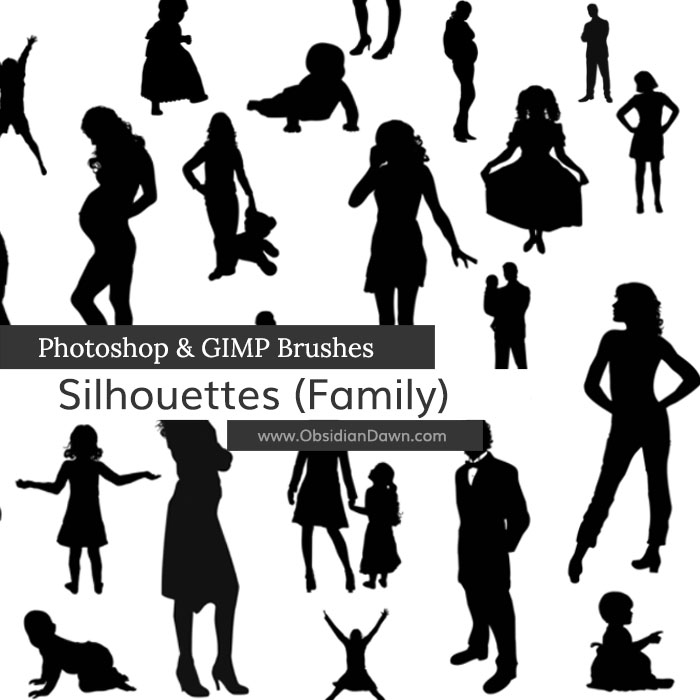
A set of Photoshop & GIMP brushes composed of various various silhouettes of people! This set is centered around families and people in general. These are all vector designs, and all are very high resolution.
Included are humans of all ages and walks of life, from a baby to a small child to a little girl or boy to a woman or man! Also includes a few pregnant women, a little girl holding a teddy bear, a father holding his child, and a mother holding her child.

A big thank you to BreedStock and SXC.HU for the references!
Programs: Photoshop 7+, Photoshop Elements 2+, Gimp 2.2.6+
Brushes: 26
Size: 1.87MB
Download the brushes
Download the image pack
Please read my terms of use before downloading!
Random Photoshop Brush Tip:
You know how the grass that comes with Photoshop fluctuates in color, each time that you use it? You can do that with any brush that you want! Here’s how.
- Hit F5 to bring up your brushes tab
- Choose “Color Dynamics”
- One way to control the color is to choose two colors for your foreground and background colors. In the case of a blade of grass, say… light green and dark green. Then set the “Foreground/Background Jitter” bar somewhere between 25-75%. When you use your brush, it will now vary in color between the foreground and background colors that you chose!
- Another way (or you can do the former and then ALSO do this) is by using the Hue, Saturation, and Brightness Jitter sliders.
- Hue will change the color itself. Set it at about 10%, and your green will become both a blue-green and a yellow-green sometimes.
- Saturation will change the intensity of the color. Set it at 20% or so, and your green will switch between a bright, vivid green to a slightly grayed-out green.
- Brightness will change the darkness of the color. Set it at 20% or so, and your green will range between a light green and a darker green.
Play around with these settings, and you can achieve all kinds of color variations!


9 Responses to “Silhouettes Photoshop & GIMP Brushes”
I was very beautiful brush
Cool. Really its a nice collection. thanks
nice set. Thanks!
[...] Silhouettes Brushes [...]
[...] Silhouettes Photoshop Brushes [...]
Thank you.
these are so nice! thank you =)
Thankyou for making :)
I’ll have alot of fun with these :)
Thanks so much for the tip!
It’s been driving me crazy trying to figure out how to do that! *giggles*
(I’m a self-taught photoshop enthusiast.)
Best of wishes ~Sha’
Leave a Reply
Other Links
Member Center
Getting Started
Affiliates
Helpful Links
Follow Us
By Program
Latest Downloads
Popular Now
Web Design and All Content
© 2004-2009 Obsidian Dawn