
Feb 8 2008

Valentine’s Day Photoshop & GIMP Brushes

Category: Brushes | Tags: , , ,

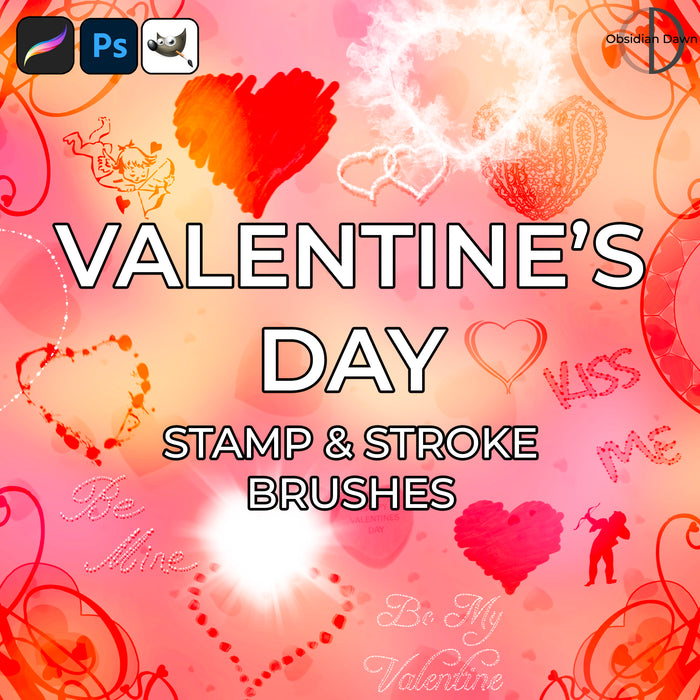
A set of Photoshop & GIMP brushes composed of various Valentine’s Day Themed images. They are fairly high resolution, being about 1300 pixels on average.

Valentine's Day Brushes

Includes: various Valentine’s Day sayings (Be Mine, Be My Valentine, Happy Valentine’s Day, etc), several single candy hearts (with and without messages), 2 groupings of candy hearts, 2 cupids, 4 heart-themed corner brushes (2 different types), heart of flames, gel heart, heart of glows, heart of light rays, heart with an outline design, 2 hearts made of painted brush strokes, paisley heart, heart made of rose petals, heart scatter brush (must be painted with, and the hearts will scatter about), circle of hearts, scattered hearts, two hearts overlapping, texturized, and a heart made of splattered blood (so romantic, eh?)

Programs: Photoshop 7+, Photoshop Elements 2+, Gimp 2.2.6+
Brushes: 30
Size: 9.96MB


You can download the Valentine’s Day Photoshop & GIMP Brushes here, which were made as an exclusive set for Photoshop Support.

Please read my terms of use before downloading!

19 Responses to “Valentine’s Day Photoshop & GIMP Brushes”

  1. Evelyn

    I downloaded the abr so I can open them up with abr viewer and use them in PSP :) Very cool brushes! TY!

  2. ste

    ehuehuehueh….. beatuful..

  3. tora

    yeh cool these are just what I need right now. TY

  4. Hi! I was redirected to a site that requires a monthly fee so was unable to download. :-(

  5. @Amanda: Photoshop Support doesn’t require a fee. Go to that page (http://www.photoshopsupport.com/photoshop-blog/08/02/heart-photoshop-brushes-hearts.html), and just underneath all the bullets where it lists what is in the set, you’ll see a “Download the Valentine’s Day Brushes” link, where you can download the file directly.

  6. beulahmom

    Thank you for sharing!

  7. Xyla nicole

    waaa (0o0) soo beautiful !!!

  8. kamalia

    can i use it on cs3?

  9. PawFace...

    *sigh* these look amazing but whenever I click on the download link a webpage comes up saying 403/404 forbidden

  10. Yep, I’m working on fixing that. In the meantime, I’ll send the set to you in an email. Sorry for the inconvenience! Should be fixed soon.

  11. WaltinaChan

    Wow, so beautiful brushes! <3 I will so use them on a Happy Valentines-card for my boyfriend. =3

  12. dorkie corkie.

    Hey, I click on the link and it’s saying I can’t download them. Something about a missing link or other. Any way you could just e-mail them to me?

  13. @dorkie corkie: Perhaps PhotoshopSupport.com was down momentarily, but it’s back up now. It’s the very first link under the post on this page:

    http://www.photoshopsupport.com/photoshop-blog/08/02/heart-photoshop-brushes-hearts.html

    If you’re still having trouble, let me know and I’ll email them to you.

  14. CelticD

    Am I blind or just not recognizing the download link for these brushes? LOL

  15. CelticD

    Yep just blind LOL

  16. Katie

    Could I ask, in the graphic, how did you make the grouping of candy hearts look like real candy hearts with each one a different color? I’ve been messing around with layers and such, but don’t seem to be figuring it out, thought I’d ask for a little direction. Thank you, these are wonderful!

  17. @Katie: I have a tutorial that explains how I did it. Check out my tutorials section in the top bar, then “Multiple Colors With Brushes Tutorial”. That should help you out. It IS done with layers.

    If you get stuck anywhere or have trouble with it further, feel free to email me. :)

  18. Hey! Happy Valentines Day everyone. Wish you all to have a very sweet moment with your loved ones.

  19. Hey! Happy Valentines Day everyone….. Wish you all to have a very sweet moment with your loved ones.

Leave a Reply

See Your Image here - Submit Now!
Obsidian Dawn on Facebook