Aug 2 2006

Animal Prints Photoshop & GIMP Brushes
Category: Brushes | Tags: , , , ,

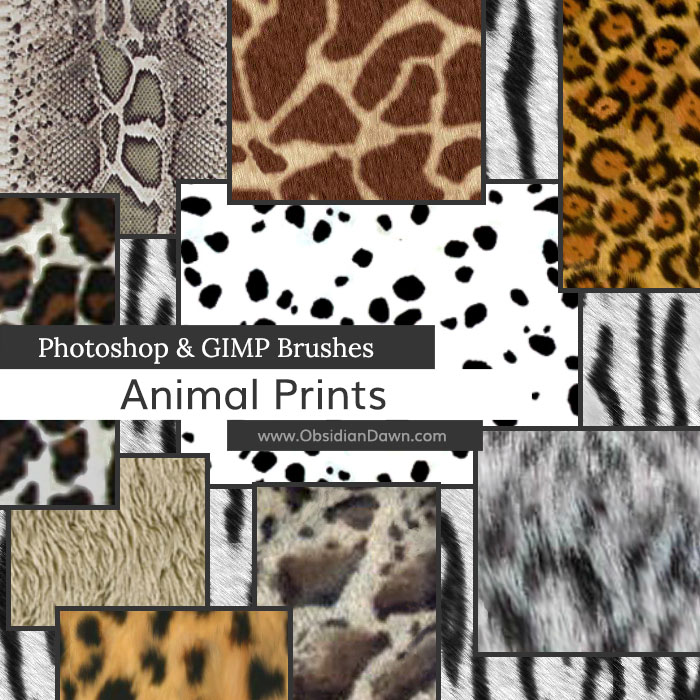
A set of Photoshop & GIMP brushes composed of various animal prints or textures. If linked, they should be relatively seamless.

Animal Prints Brushes

Includes: cheetah, cow, dalmation, plain fur, giraffe, jaguar, leopard, lynx, ocelot, snake, snow leopard, tiger, white tiger, zebra

Programs: Photoshop 7+, Photoshop Elements 2+, Gimp 2.2.6+
Brushes: 17
Size: 2.76MB


>> Download the brushes
>> Download the image pack

Please read my terms of use before downloading!

Also available as PS Patterns!

35 Responses to “Animal Prints Photoshop & GIMP Brushes”

  1. Patty

    Very cool, thanks a bunch.

  2. Tay

    I’ve been looking everywhere for animal print brushes, thanks.

  3. Steve F

    Many thanks, great brushes

  4. AAAAAAAAAW BIG THANKUUUUUUUU!!!!

  5. Manny

    i love u :D

  6. Khandie Ferrarez

    Purrrr-fect!!! As an animal lover (especially cats), I adore these brushes! Your site has everything!!!

  7. Evelyn

    Awesome brushes! TY!

  8. wow!!!1 This are the one I’ve been looking for. THANK YOUUUUUUUUUUU SOOOOOOOO MUCH! YOU ARE THE BEST!!!!

  9. FynaLuna

    THANK U :)

    THEY ARE COOL!!!

  10. Nikkhi

    How do you get the 2 colour in ther, black and orange in the cheetah one

  11. Nikkhi

    sorry the leopard one

  12. Ki

    Great brushes! Very useful. Thanks for sharing!

  13. Oh hun ,I think I’v gone to brush heaven,cant wait to see if I have downloaded them ok,and start to play around with them.thank you so very much for sharing !.
    kind regards
    karen.

  14. Katie

    THANKS!!!!!!!!!!!!!!!!

  15. absolutely fantastic have had to install the ones I want for a picture as and when I need them as when had all of the ones I liked installed (about 35) Gimp slowed down quite a bit :)

  16. Designer

    A BIG THANK YOU

  17. you made my job 1000 times easier.
    I LOVE YOU! and Thank you soo much.

  18. marina

    muy buena la pagina pero como se hace para descargar no entiendo una puta madre?

  19. @marina: Mis disculpas, pero ninguno de la traducción de los servicios Traté de uso que podrían hacer cualquier sentido de esto. ¿Podrías formularla de nuevo, tal vez?

    English: My apologies, but none of the translate services I tried to use could make any sense of this. Could you reword it, perhaps?

  20. eduardo

    hi i like your brushes my question is.. can i use them for the yearbook of my schoo.. im helping to create background and im wondering if i can use your brushes to do it..

  21. @eduardo: Sure! As my terms of use states, you can use them anywhere as long as you either a) credit me for their usage or b) buy a license for them. In a yearbook, you should be able to very easily credit me on a credits page somewhere. The credit should go to http://www.obsidiandawn.com. Thanks!

  22. eduardo

    thank you very much… if you have tips or something to create really cool background please tell me.. because im barely starting with photoshop.. or ideas for yearbooks… thanks

  23. eduardo

    me again XD.. my email is oelopez91@hotmail.com
    maybe we could talk in msn .. i would like to learn more about photoshop..

  24. romi

    I love t very good . I M from Argentina esta re bueno estos pinceles de animal print. Me gutaria que esta pagina también se encuentre en español! gracias! impecable tu trabajo!

  25. kawaii1992

    thank you so much all credits should go to
    http://www.obsidiandawn.com

    thanks again :3

  26. Unknowen

    I’ve downloaded this set of textures but I can’t seem to download any other bushes er* Thanks again for the additional information you’ve been giving me to help me threw this .. I may need some more help with this stuff *lol* This brush set is wonderful to own btw! Especially if you’ve got requests for many savanna backgrounds = P

  27. Luke H

    Hi, just wondering why these brushes wont load on my photoshop?

    im using c4 (i think) or cs3 portable……idk tbh…..any help??

    thanks =D

  28. @Luke H: They work with both CS4 and CS3. Check out my sidebar, under the “Installing Brushes” tutorial – that’ll get you going! Make sure you’re unzipping them. :)

  29. Luke H

    @stephanie: Hey I unzipped them and go to load brushes and it doesnt show up…… yet all the other ones i downloaded do….?? i even tried typing in the name of it and it said the file could not be loaded because it isnt compatible with this version of photoshop… im confused! its only the animal ones i really needed and they happen to be the only ones that dont work. Thanks =)

  30. Luke H

    @stephanie: actually just been on PS and looked at the file type for the animal prints and it wasnt an ‘ABR’ file that i exracted…..it was ‘PAT’ file….. =S thats why it wont work but wy is it like that and not ‘ABR’? many thanks! =D

  31. Luke H

    this is just to everyone!: me……AGAIN! I sussed it out….I must have clicked download image pack not brush pack by acient and not realised just tried again and its working thatnks for your help and sorry for spamming your email haha SORRY!!! =D

  32. You are awesome! THANKS!

Leave a Reply

See Your Image here - Submit Now!
Obsidian Dawn on Facebook