Crop Circles Photoshop & GIMP Brushes
Posted in: Brushes | Tags: , , , , .

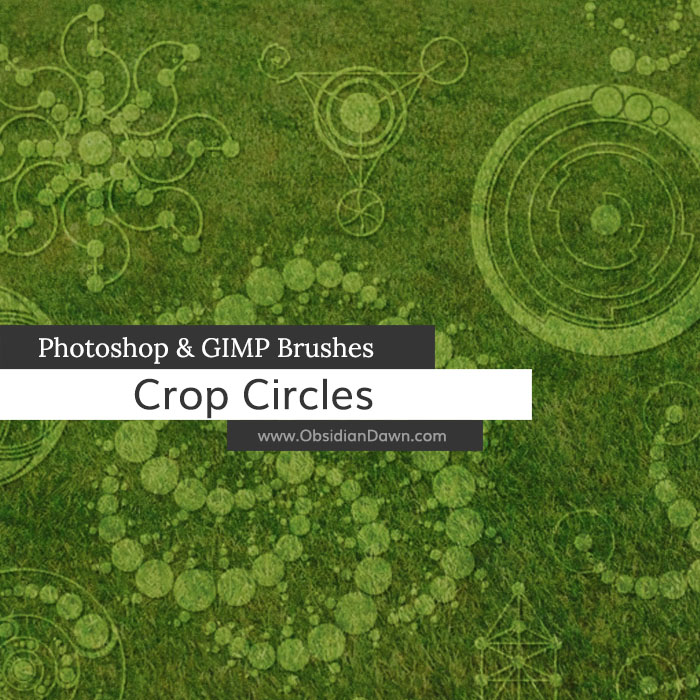
This set of Photoshop & GIMP brushes is composed of crop circle shapes. They’re all beautiful radial designs, so even if you have NO use at all for crop circle brushes, you’ll certainly find a need for these somewhere. Many of them are also shapes in Sacred Geometry.

There is no texture added to these. They are the shapes only. That way, you can apply them to an existing crop texture (or whatever) and create the circles. (Tip: If you’re not looking at your crop from straight above it, make sure you use these on a new layer, so that you can use the Edit > Transform tool to skew their dimensions to look like they’re lying down in the field.)

These are all very high resolution images, with the average brush size being about 2000 pixels.

Crop Circles Brushes

Programs: Photoshop 7+, Photoshop Elements 2+, Gimp 2.2.6+
Brushes: 21
Size: 5.9MB

Crop Circles Brushes
How to Install?
Terms of Use
 

Download the image pack (for those without Photoshop & GIMP)

Be Sociable, Share!
  • Twitter
  • Facebook
  • email
  • StumbleUpon
  • Delicious
  • Google Reader
  • LinkedIn
  • BlinkList

16 Responses to Crop Circles Photoshop & GIMP Brushes

  1. Audrey Derell says:

    Your brushes are amazing…I am keenly absorbed in sacred geometry
    right now, so these are a beyond special gift, thanks!!

  2. Robyn says:

    Thank you Stephanie. As always, your brushes are lovely and most appreciated!

  3. Annie says:

    Merci beaucoup!

  4. dointhings says:

    ooooh these are very nice, as always, thanks for sharing your wondeful talent
    Sue : )

  5. Mungo says:

    Thank you Stephanie for this superb gift

  6. Sandy_in_MD says:

    Thank you so much for this fantastic brush set!

  7. Marilyng says:

    you are amazing!!! I wish I had your talent!tu so much!

  8. JoyceB says:

    Love these…..thank you, Stephanie!

  9. Dixie Lee Atkin says:

    Thanks Steph these are super as usual.
    I love working with your designs
    Blessings from the USA***

  10. Esther Beale says:

    Thanks so much. These are wonderful! Can’t wait to see what you come up with next. ;) xxx

  11. zep says:

    thanks…amazing brushes

  12. Hey, I was just going to let you know I wanted to use one of your stamps for my watermark for my photography. I don’t make money off doing this and was wondering if that was fine with you if I use them. Please email me back because I won’t upload til I know for sure. Thanks so much, this is a beautiful set. Much love.

    Elle

    • Stephanie says:

      The same thing applies for non-commercial and commercial work. You can read about it fully in my terms of use, here: http://www.obsidiandawn.com/terms-of-use

      Basically, you’re welcome to use them for your watermark, but you’d have to credit me alongside everywhere that you used that watermark. If you’re putting them on your website only, though, something like that would be easy enough to do with a link/credit in the sidebar/footer, as long as that sidebar/footer shows up on every page of your website. If you’ll be displaying those photos other places, though, you’d need to credit me there too.

      Long story short, it’s certainly doable, but kind of annoying to use my brushes in something like a logo or watermark, since it’s difficult to credit me alongside them every single place you display them. However, you’re more than welcome to try. Otherwise, you can purchase a commercial license for the set with the brush you’re using in it, which is only $3 and covers ALL usage of every brush in the set.

      Hope this helps!

  13. Jammel says:

    Fantastic brushes! You saved me a lot of work. Thanks!

  14. Christina says:

    In LOVE with your brushes!! Thank you so much!! I am a starting designer and not a whole lot of money…so this is great!!! no problem with crediting at all!! Actually do you have a button or something that I could stick on my blog? I put all my CU lic buttons..along with my favorite places on there!! Thanks!

Leave a Reply

Your email address will not be published. Required fields are marked *

You may use these HTML tags and attributes: <a href="" title=""> <abbr title=""> <acronym title=""> <b> <blockquote cite=""> <cite> <code> <del datetime=""> <em> <i> <q cite=""> <strike> <strong>