Oct 8 2006

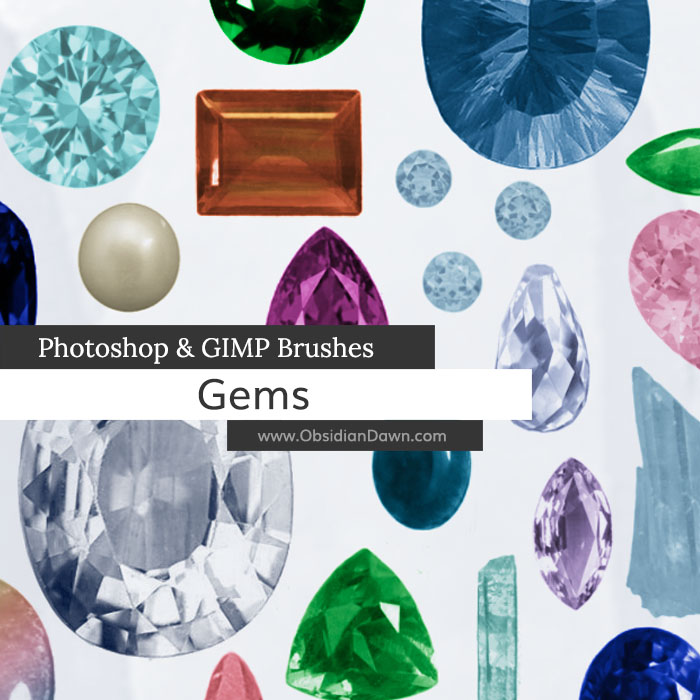
Gems Photoshop & GIMP Brushes
Category: Brushes | Tags: , , ,

A set of Photoshop & GIMP brushes composed of various gems.

Gems Brushes

Includes: all of the more popular “cuts” of gems, various stones, pearls, and a few crystals

Programs: Photoshop 7+, Photoshop Elements 2+, Gimp 2.2.6+
Brushes: 31
Size: 1.66MB


>> Download the brushes
>> Download the image pack

Please read my terms of use before downloading!

10 Responses to “Gems Photoshop & GIMP Brushes”

  1. I have been looking for gem brushes for ever! These are perfect – hope to use them for clothes textures for Poser. Hope that is OK. Thank you very much.

  2. I have never seen so many wonderful brushes! I cannot wait to venture out to the other areas of your forum! tyvm seems like it just doesn’t quite be enough but I ty from the bottom of my heart! God bless you!

  3. tea

    ohwow ! those are gorgeous !! thanks so much !!

    i really tried making my own gems.. but yea.. somethings just dont work out xD

    thanks again

  4. lisa

    I love these gems, however, I’m not sure how to color them. Can you explain how to get them to look nice like yours. I’m new to PSE 7. Thanks for your work. lisa

  5. @Lisa: The way that I did it is the same as how I explain in my “Removing Transparency from Brushes” tutorial. Check my tutorials section for it!

  6. shaylawolf

    Hi… am new to this and forsome reason on gimp the things are labeld diferantly than on photo shop .. can ya give me directions on how to make the gem brushes gem like on gimp please *am groveling* lol
    thanks hope ya can help lol or .. know someone who can cause im a confused puppy lol.
    hugs , Shayla

  7. @shaylawolf: Sorry, Shayla, but I know absolutely nothing at all about GIMP! Wish I could help, but I’m a Photoshop user. These brushes were made first and foremost for Photoshop, GIMP just added the functionality so they’ll work. And I’d rather make more resources for you guys rather than take all that time to learn a new program! Sorry I couldn’t help and good luck!

  8. shaylawolf

    is ok .. *pouts* lol but mabe someone else has a clue how to do it on gimp and can tell me what im doin wrong.:o* ty any how

Leave a Reply

See Your Image here - Submit Now!
Obsidian Dawn on Facebook