Glowing Shapes Borders Photoshop & GIMP Brushes
Posted in: Brushes | Tags: , , , .

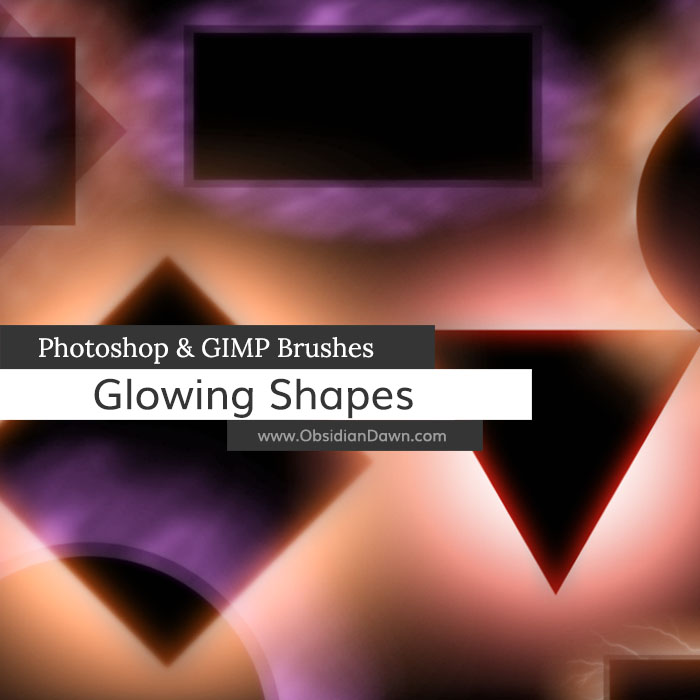
This set of Photoshop & GIMP brushes is composed of various shape “holes” with glows around them. They are meant to be used as borders around … well, whatever you want them to border. They are transparent in the center, so that whatever they’re bordering can show through.

They are all extremely high resolution, with an average size of about 2000 pixels. Enjoy!

Glowing Shapes Borders Brushes

Programs: Photoshop 7+, Photoshop Elements 2+, Gimp 2.2.6+
Brushes: 26
Size: 17.2 MB

Glowing Shapes Borders Brushes
How to Install?
Terms of Use
 

Download the image pack (for those without Photoshop & GIMP)

32 Responses to Glowing Shapes Borders Photoshop & GIMP Brushes

  1. Taeliac says:

    That is a really great idea, and rather useful, too, especially for highlighting parts of photomanips with people – I’m picturing some rather interesting Avatar: The Last Airbender ideas myself…

    Thank you for creating so many amazing brushes!

  2. jg says:

    awesome brushes. thanks for sharing your work so generously.

  3. Sandy_in_MD says:

    Another great set – thank you so much, Stephanie!

  4. Edna B says:

    Thank you so much. These look quite interesting.

  5. Traci says:

    Outstanding….as always, Stephanie! Thank you so much.

  6. Helen PENDER says:

    THANK-YOU for another great Collection – you are so very generous – I’m sure these will be very useful …..

  7. M10tje says:

    Again many thanks for sharing.
    These are just what i needed.

  8. Dixie Lee Atkin says:

    Thanks Stephanie, I love these.
    Blessings
    from the USA***

  9. Amanda H says:

    Your work is amazing! I love these and already I’m picturing things in my mind to do with them. Snagged the brushes with credit. Thank you very much for sharing your talent with us!

  10. Zap says:

    *Slaps you* WHY DID YOU MAKE THESE RIGHT AFTER I NEEDED THEM???? *Crys sadly* *Downloads them*

  11. Su Hall says:

    Oh, how cool! These will be fun to play around with. I love them! Thank you!

    Su

  12. Mshaleen says:

    Hello,I just want to let you know I’ll ocassionally use your brushes on my flickr account.
    Of course I’ll leave a link to your site ^^
    Thanks so much for all your brushes!!
    My Flickr is http://www.flickr.com/myriahshaleen
    I think that’s it….

  13. Pingback: COLECCIÓN DE PINCELES « Nakoteka's Blog

  14. JoyceB says:

    Very nice, Stephanie…..thank you!

  15. NannieLana says:

    There are not many on this planet like you, you share and make a site for all your work, bless you

  16. Lucy says:

    Awesome, I like them :D

  17. Anne says:

    Oh, another beautiful set! Thank you so much for so generously sharing your work with us. Your brushes are most beautiful and so versatile. :)

  18. Mungo says:

    Brilliant brushes, thank you

  19. Arianna says:

    thanks you!!!! your sets are really beautiful!!!! *____*
    i love they!! :D

  20. Monica says:

    Thank you so much!!

  21. nubsol says:

    Awesome, I love it !

  22. Bob Dole says:

    Your talent in not only creating so many wonderful brushes but also in designing this website is unbelievable. It’s obvious you’ve put a lot of time and heart into it, and it has definitely paid off. Thank you so much for all that you have done for and contributed to the Photoshop community. I see from your “About” page that you are a military wife. Your husband is a very lucky man to have someone like you by his side!

    Best of luck and best wishes,

    Bob Dole

  23. Jenn says:

    Thanks so much for sharing. You’re amazing and generous. Brushes always gorgeous. <3 Always my first look-up for new brushes. ;3

  24. ulysis says:

    This is a great resource. I saw that you can use Gimp too which is great as I do not have Photshop yet.

  25. Tracy Blackburn says:

    Thank you for your FANTABULOUS brushes, you are so generous with your sharing your incredible talent. I love your work!!!

Leave a Reply

Your email address will not be published. Required fields are marked *

*

You may use these HTML tags and attributes: <a href="" title=""> <abbr title=""> <acronym title=""> <b> <blockquote cite=""> <cite> <code> <del datetime=""> <em> <i> <q cite=""> <strike> <strong>