If any of you out there still have links to me under my old URL (www.brushes.obsidiandawn.com), I’d really appreciate it if you could change them to the base domain (www.obsidiandawn.com). Thanks so much!
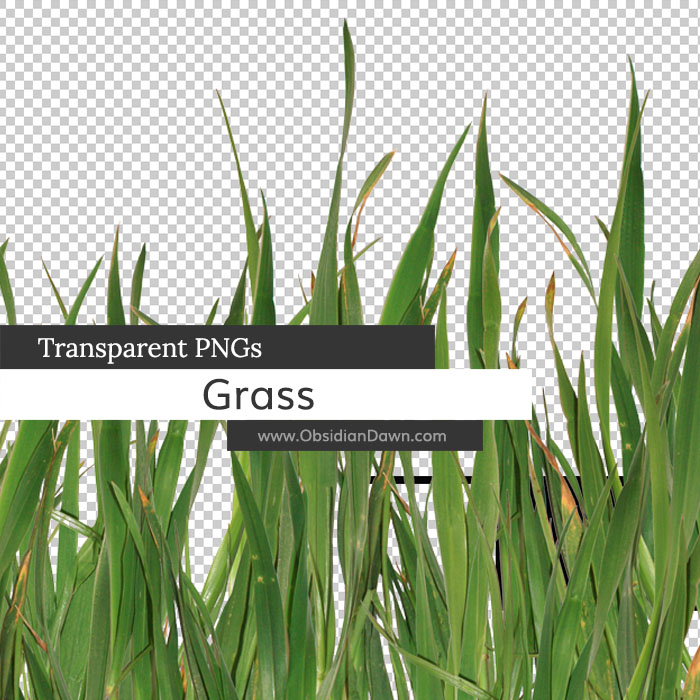
This set of various photos of grass as transparent PNGs can be used in any program that will support *.PNG files. Photoshop, GIMP, PSP, and many more. These images average about 2500 pixels (square-ish) in size @ 300 dpi.
Included are various clumpings of grass, as well as a few blades of grass on their own. They all have a transparent background, and can be very easily copy/pasted into your own work. There is also a large grouping of the grass that I’ve already put together in various layers for you, for use as a foreground. You can use them on their own, layer them to give them a bit more depth, etc. etc.

Programs: Photoshop, GIMP, PSP, and many more
Images: 7
Size: 29.4MB
Please read my terms of use before downloading!
Photoshop Brush Tip:
Are you downloading a lot of Obsidian Dawn Photoshop brushes? Or perhaps you’re having a hard time keeping track of who’s resources are who’s?
Well, worry no longer! Are you aware that you don’t have to put all of your brushes straight into the Photoshop > Presets > Brushes category? You can make folders within that folder, as well.
For example, I have a folder for all of my Obsidian Dawn resources, another one for my own, personal brushes that I use for my paintings, etc. etc. You could have one folder for each place or person that you download resources from, and never have to worry about where it came from again. Simply go check your folders.
Folders within folders work, too – so organize to your heart’s content!


27 Responses to “Grass Transparent PNGs”
FABULOUS!!! Love the grass!
And thanks for the reminder…I forgot to change the link on my blog to your site. DONE :)
I sure don’t know where I’ve been but you have an AWESOME blog!!! I love your stuff…. I could spend DAYS pouring through all your amazing creations. Thank you!
These are fabulous! Thank you!
Thank a million for your fantastic work always and thank you one more time for shared with all us.
Sorry for my english is very bad!
Hugs!
:)
You continue to delight and amaze me with your creations and willingness to share your talent. Thank you many times over.
Thank you so much, I love these and I am going to do the folders within the folder thing.
I’ve been looking for something like this thank you so much.
Thank you, ma’m. I love these! It’s spring, a time of renewal and new growth. I’m seeing a floral layout with grass and…LOL You inspire me, to say the least.
Thank you,
Su
Thank you so much!
thank you so much, stephanie! these are awesome! :D
THanks so much,again! You are too good to us!
Many thanks, Stephanie!
Thank you so much for the grasses. They are just wonderful.
Thank you so much for sharing all of your great work! It is so very much appreciated.
Stephanie,
Thanks so much for these grasses and the tip about the brush folders. I never knew that! I love your work and use your designs quite frequently. Thank you again for your time and talent in sharing your designs with us.
~Barbara- Just Passing Through
Awesome grass images. Thank you!
Thanks Steph, I have been using cutouts when I want grass and just never quite liked them enough to keep them in the picture. Now, thanks to you I have grass!!!! Thank you so much,
Hugs,
Jo
Superb! Thank you!
thank you – just what I have been looking for!
WOW! you are truly the BEST! Thank you so very much for sharing your AWESOME talent!! Have a BEAUTIFUL day!! :)
You’ve managed to make grass exciting again. LOL Thanks for doing such great extraction work for us. Love this!
Great idea for the organization but what do you do when you have hundreds of brushes?
I have many folders, all organized per subject (objects, flowers, ornament etc) …
I personally think that every brush set should come with a file with all details about the designer.
@shir: I’m not sure what the best option for you is, then. It sounds like you’re doing it right. Each brush file SHOULD come with something to let you know who’s it is.
In my case, I do three things. I have the “SS-” in front of it, if it’s a brush set. They should all come with a readme.txt file that has my rules. AND the very last brush of every set has a “credit brush” that gives my URL and info.
You could always rename the files to have the brush maker’s name preceed the brush name, or their initials, or something. (That’s what “SS” is, btw – my initials… in hindsight, I should’ve used “OD” for Obsidian Dawn, but ah well!)
Good luck! :)
nice add, been looking ages for this, tnx alot
[...] Descargar imágenes de césped [...]
buenisimo gracias por el aporte me sera muy util
Thanks so very much for sharing your wonderful talent with us.
Leave a Reply
Other Links
Member Center
Getting Started
Affiliates
Helpful Links
Follow Us
By Program
Latest Downloads
Popular Now
Web Design and All Content
© 2004-2009 Obsidian Dawn