Jul 25 2009

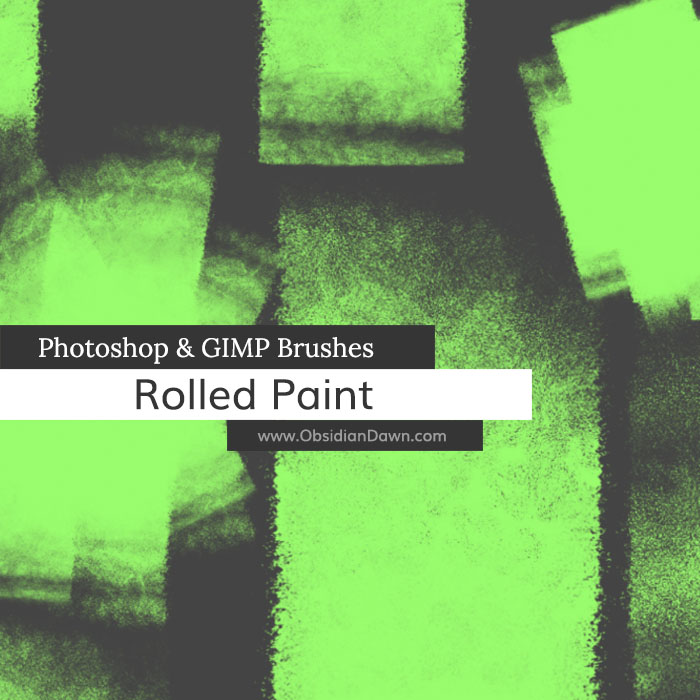
Rolled Paint Photoshop & GIMP Brushes
Category: Brushes | Tags: , , ,

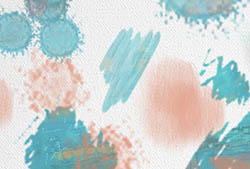
This set of Photoshop & GIMP brushes is composed of various shapes of rolled paint – the kind that you roll on with a paint roller, that is. It includes several single rolled strokes, many put together, and also includes some that you can paint your own paint strokes with. This just includes the kind of textures made from a regular roller – no special effect kinds of paint here. They are all high resolution, with an average size of about 2300 pixels.

Rolled Paint Brushes

Programs: Photoshop 7+, Photoshop Elements 2+, Gimp 2.2.6+
Brushes: 23
Size: 30.6 MB


>> Download the brushes
>> Download the image pack

Please read my terms of use before downloading!

You can read how to install & use these brushes here.

Photoshop Brushes Tip:

Here’s just a small tip I’d like to give you in regards to the brushes in this set that were made for actually painting those strips of rolled paint yourself.

The brushes are named “single-painting” (1-4), and were made so that you could load up that brush, then click and hold as you painted your own roll of paint. HOWEVER, unless you’re going to be doing it straight up and down, then you’re going to want to make one small adjustment before you start painting.

  1. Open your brushes tab (F5) and click on the top of the options area (left side), where it says “Brush Tip Shape.”
  2. Whatever angle you want to brush your paint, either set the angle by typing it next to where it says “Angle:” or by clicking and dragging on the circle with the crosshair just to the right of it (leaving the arrow pointing in the direction/angle you’ll be painting).
  3. Now, go ahead and paint with that brush in the direction you just set, and you’ll get a much more realistic looking paint stroke.

25 Responses to “Rolled Paint Photoshop & GIMP Brushes”

  1. LivE

    thanks so much, stephanie! these are awesome!

  2. Another great brush pack from an exellent artist.
    Thanks

  3. Helen

    Great! another wonderful Collection! ~ Thank you, very much!

  4. Sandy_in_MD

    Another great set – thanks, Stephanie!

  5. JoyceB

    Wonderful…..thanks again!

  6. Cool! Building a layout with brushed strokes is a current interest of mine. These will certainly be put to good use. Thank you for sharing them.

    Su

  7. Awesome, how original! Thank you so much! :)

  8. Hello,

    Just a courtesy note to let you know that this brush set was mentioned in The Nut Cluster ep06 , the podcast of TipSquirrel.com

    Thank you for sharing

  9. Thanks again for sharing! These are just awesome!

  10. Beth

    Thanks so much!

  11. Rebecca

    thanks so much, I’m looking forward to playing with these!

  12. I am in awe of all your creations! I learned so much from the tutorials. I’m an absolute beginner and can’t wait to apply what I’ve learned. With all the new options for custom digital textile printing, I’m anxious to design my own fabrics. Thank you so much for your generosity.

  13. odessa

    I cannot download this brush file. When I hover over the link the address pertains to another url address instead of a zip file, as it reads “http://www.obsidiandawn.com/dcount/click.php?id=202177″ instead of a direct link to a .zip., and clicking on it sends me to another page that says “This ID does not exist!”

  14. @odessa: My apologies, I mixed this up last night when I was fixing some things. It should work now! (It still won’t link directly to a ZIP file, though, that’s my download tracker… but it’ll work!)

  15. odessa

    Thanks very much for these brushes and for fixing the link!! They are awesome, and my download worked now! You sure do make some fantastic brush sets! Thanx again!

  16. Juan

    I cannot download this brush file. RAR says “File is damaged” .

  17. @Juan: Hmm, sorry about that! It’s working now :)

  18. Olá amigo postei um link pra seu site em meu blog, caso queira conferir este é o endereço: http://cursodesigngrafico.blogspot.com/2009/09/vetores-gratis-download.html

    se estiver violando os seus direitos me avise que retiro.

    obrigado

  19. Juan

    Thanks a lot !!!! :3

  20. Oh, this is a attractive collection I ever seen. I like the edge of the shapes. Thanks for sharing. Downloading….

  21. Dila

    I have dowloaded your set of brushes, but can’t use it at all. Please help me how to use them. They are in jpg format, but while loading brushes it demands brs format, what should I do

  22. @Dila: If they’re in JPG format, you didn’t download the brushes – you downloaded the image pack, which I also have available for people that can’t use the brushes themselves. Re-download, and be sure you click on “Download the brushes” and not “Download the Image Pack” and you should be good to go! :)

  23. Scrappy_d

    Again,thank you.I’m having a blast downloading your beautiful brushes.Lots of scrapbooking ahead.

  24. nice brushes. i will try this

  25. i absolutely love your brushes and images! thank you so much for your generosity!

Leave a Reply

See Your Image here - Submit Now!
Obsidian Dawn on Facebook