Aug 18 2006

Stitching (Sewing) Photoshop & GIMP Brushes
Category: Brushes | Tags: , , ,

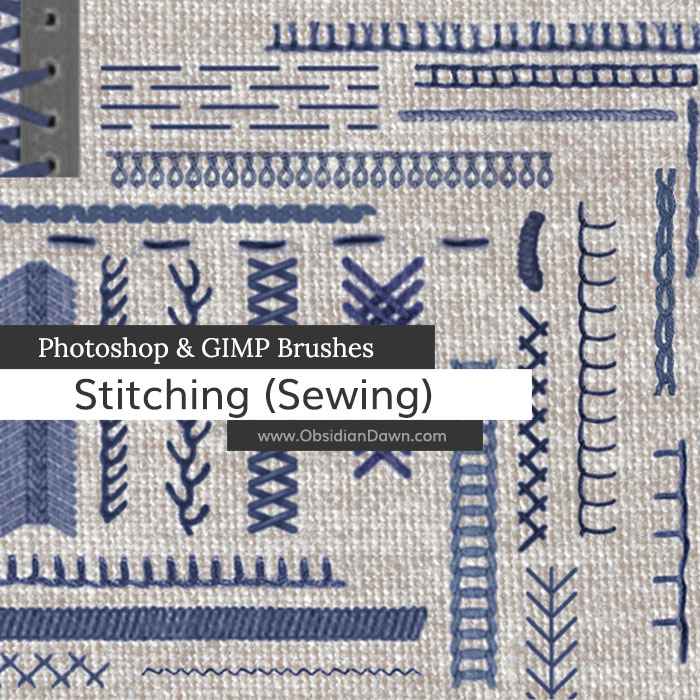
A set of Photoshop & GIMP brushes composed of various shapes and types of stitching and stitches. Works great for borders and scrapbooking!

Stitching (Sewing) Brushes

Includes: arrowhead stitch, basque stitch, several blanket stitches, a bullion knot, cable stitch, chain stitches, various types of feather stitching, coral stitch, cord stitch, corset laces, several cross stitches, darning stitch, fern stitch, gobelin stitch, hemming stitch, herringbone stitch, hidden stitch, ladder stitch, running stitch, stem stitches, vandyke stitch, and a zigzag stitch

Programs: Photoshop 7+, Photoshop Elements 2+, Gimp 2.2.6+
Brushes: 33
Size: 861KB


>> Download the brushes
>> Download the image pack

Please read my terms of use before downloading!

18 Responses to “Stitching (Sewing) Photoshop & GIMP Brushes”

  1. Liz

    Thank you so much for this! This is EXACTLY what I was looking for! Thank you thank you!

  2. jkaotic54

    COOL! Thanks. :D

  3. pansy

    very funny and useful!! thanks a lot!

  4. gillian

    What am I doing wrong? If I select, eg, the running stitch brush, it comes up as a straight running stitch that is x number of pixels long. I’d like it to follow a curve. Do I have to rework this as a new brush that it is only one stitch long? thanks.

  5. @Gillian: Yep, that’s exactly what you’ll have to do. I actually have one made for you, and a tutorial that explains exactly how to do it. It also explains a few other things, but that’s in there.

    Check it out here: http://www.obsidiandawn.com/advanced-brush-techniques-in-photoshop-tutorial

  6. thnx po sa type of the stitch’s thank you very much

  7. miss

    it seems really nice brushes , but i cant download this … wheni click on downlaod brush nothign happens y…?

  8. @miss: Not sure what could be causing that. I just downloaded them fine. Perhaps it was a temporary problem? Try again. :)

    If you’re still having problems, then it’s your browser settings.

  9. raze

    this is amazingly good..thx

  10. omg u even have something like THIS??? wow wow wow!!!!
    I SO need this thank u so much!!!!

  11. hey.
    I was trying to download this and when I got to the folder SS-Stitching Id open it and a webpage would show up and Id click open.
    and it would just close out! ]= help me!

  12. Steph
    In the image pack you’ve given the brushes names, but when I load the abr into GIMP, the brushes are listed by number. Can they be changed into brush names (or can the numbers be added to the image pack as the first part of the file names?)

    Thanks,
    Marc

  13. @Marc: Well, you shouldn’t have to download the image pack to use these in GIMP. GIMP 2.2.6 or higher WILL recognize the ABR brush file that you get when you download the brushes. I’m fairly sure that they will then be listed by the brush names, from what I’ve read from others.

    I’m just going off what I”ve heard, however, because I do not own GIMP and therefore can’t really offer support for it, sorry! These were made to be Photoshop brushes originally, and that’s the only one I can offer much support for. Good luck, though, and let me know if loading the brushes that way worked!

  14. Stephanie,
    Thanks for the quick follow up. It looks like it is a GIMP problem with the way it loads ABR files. The brush names get lost inside of GIMP, and the brushes only come through as numbered sequences for a given set. When I downloaded the single stitch brush, the name of that one came through fine.

    Just for completeness – I only downloaded the image pack to work with the images themselves (rather than the brushes). I know they aren’t needed for installation. Installing ABR brushes in GIMP is pretty straightforward as all you need to do is drop them into the brushes directory.

    I’ll try to follow up on the missing brush names issue.

    Thanks again,
    Marc

  15. Arhazivory

    These brushes are really great and it’s exactly what I was looking for. Thanks a lot for creating the pack and sharing it with us. XD

  16. inke nameyad! chizas in ggozashtitan!!!

  17. Dianne

    Hi There,
    I downloaded your snow brushes and made a snow animation as a card for my friends for christmas….They are fantastic brushes. thanks so much for sharing them, I have really appreciated them. Cheers

  18. Wow… this is what I need :-) Awesome!! Thanks a lot. I want use this for create scrapbook layout

Leave a Reply

See Your Image here - Submit Now!
Obsidian Dawn on Facebook