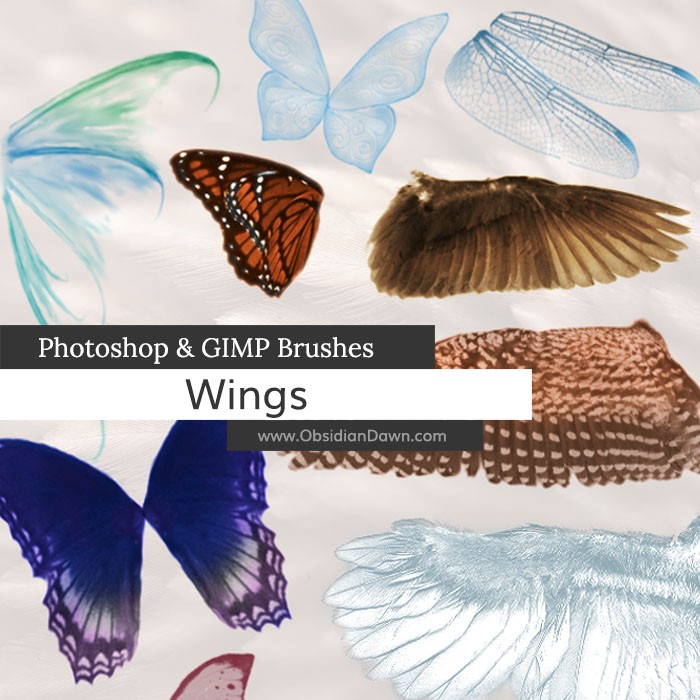
A set of Photoshop & GIMP brushes composed of various types of wings. There are both left and right versions, which are usually different, and side angles.

Includes: fairy, angel, butterfly, insect, bat, demon/succubus, dragon, dragonfly, and more!

Programs: Photoshop 7+, Photoshop Elements 2+, Gimp 2.2.6+
Brushes: 38
Size: 3.14MB
Download the brushes
Download the image pack
Please read my terms of use before downloading!


27 Responses to “Wings Photoshop & GIMP Brushes”
these r so kool
Beautiful!
Absolutely fantastic. Many thanks.
If I only have Adobe Photoshop 7 I won’t be able to use these brushes correct?
how do i send a portion of the image backward in photoshop 7?
@Fairy: Yep, you can use them just fine in Photoshop 7. That’s what I make them in. As for your second question: “how do i send a portion of the image backward in photoshop 7?” – I’m afraid I’m not sure what you mean. If you want to flip the brush, you can follow the tip at the bottom of this blog post: http://www.obsidiandawn.com/dripping-photoshop-gimp-brushes
Are we allowed to use these for adoptables,
if we remember to write the (C) For ObisidianD? :)
@Emina: Sure. Preferrably, put in the whole http://www.obsidiandawn.com in there, but whatever you can manage for credit is fine.
beautiful wings thanks a lot!!!!!!!!!!!!
heres is my link if u want to see yyour wings…nothing big.. i like it simple.
sorry this is my link……thanks!!http://www.flickr.com/photos/fotocheska/3272447543/
i really love it
i love ur site
ur an angel stephanie
hi… i’m new to photoshop… uhmmm… can u help me with something? i’m trying to put wings to some photos but i just cant make them more realistic… can u give me tips on how to make it more realistic and not transparent?
any help would be much appreciated… thanks!!!
Bless you!
@santin088: If you’re looking for your wings to not be transparent, I would check out my tutorial here on removing transparency from brushes: http://www.obsidiandawn.com/removing-transparency-with-brushes-photoshop-tutorial
My other tutorials, such as using multiple colors with brushes, and Advanced Brush techniques, should also help you out!
Good luck!
Fantastic set – thank you!
Hello!
I’ve downloaded several (okay, make that about ten or twelve) of your brush packs (for gimp). They are wonderful! Thank you so much for making them; it allows me to experiment with graphic designing and photo-editing when I am still young. (I’m only 13).
Anyways, I’ve used your brushes to create blog buttons and a background for my blog, and I just wanted you to know that I credited them to you. If you scroll down on my right sidebar, the last thing is credits.
Thank you again.
~Hannah
i them into the brushes folder and i restarted gimp.
but it wont let me use them, it come up saying i need a WinRAR license
what am i doing wrong?
shanice
You need to unzip them. You don’t have to use WinRAR, which is an extraction program. Check out my sidebar, under “Getting Started” where it says “Unzipping the File” and then maybe “Installing Brushes” too. :)
I am new to photo shop. I have photo shop 6 and CS4, would the wings be compatible with either of these? From what I seen of your wings they are beautiful.
@Lynn: They’re compatible with CS4, but not 6. If you look at the preview image and at the technical info below it, it says “Photoshop 7+”, and what that means is that it works with Photoshop 7 and any Photoshops that came out after 7, which is the CS series (CS, CS2, CS3, and CS4). Hope this helps!
I have tutorials that you can find in my top bar (and in my sidebar) that explains how to install and use anything on the site, as well as some more advanced stuff to help get you going with them, so be sure to check it out!
Reall cool wings :)
I love to make pixies so these wil be great!
Thankyou :)
so many thank you stephanie i hope i can make a beautiful photo to this brushes.. iam so excited for the beginer like me..
mwahh…
Thank you Steph for the brushes and for being kind enough to share your work with us.
Say I just want to buy the wing brushes at this time and many one other. Will I be about to use them on photos that I sell to customers?
omg it’s so awesome…
tq very much
simply perfect, thanks :)
had my fun with some of the wings :)
http://morphyvampy.deviantart.com/art/Angel-dreams-152623466
Leave a Reply
Other Links
Member Center
Getting Started
Affiliates
Helpful Links
Follow Us
By Program
Latest Downloads
Popular Now
Web Design and All Content
© 2004-2009 Obsidian Dawn